Building AI Agents in JavaScript with Agent Builder and ChatKit
Last month, I gave a talk at JS Belgrade about OpenAI’s Agent Builder.
The pitch:
OpenAI’s no-code agent builder creates and deploys AI agents into production with just a few clicks.
The reality? It’s messier than the announcement suggested, but there’s something real here.
The Starting Position
Building AI agents has been mildly frustrating. Write prompts, chain tool calls, handle errors or build UIs - all from scratch or use third-party tools to scramble an AI agent.
The pattern is always the same:
- Wire up an LLM with tools
- Add safety checks (more difficult than it looks)
- Build a chat interface
- Debug why it’s not working
- Repeat
I wanted to skip the boilerplate and focus on what makes my agent different.
October 6th 2025. OpenAI announced Agent Builder and ChatKit. Looked very early, but usable.
So, I decided to spend the last few weeks building agents with it. Here’s what actually works, what doesn’t, and where this might be heading.
What Agent Builder Actually Is
Agent Builder is a visual canvas for composing agent workflows. You drag nodes, connect them, and preview the execution with full traces.

It’s part of OpenAI’s AgentKit ecosystem:
- Agent Builder — visual workflow designer
- ChatKit — embeddable chat UI
- Agents SDK — code-first approach
- Responses API — the foundation
The node types are straightforward:
- Agent — the LLM
- Tool — web search, file search, custom APIs
- If/Else — conditional logic
- Guardrail — safety checks (PII, jailbreak detection, moderation)
- Return — output
Looked pretty good so far, covers most of what I need.
When Does It Actually Help?
I tested this on a few real scenarios. Here are the three gotchas that caught my attention:
Prototyping is very quick: Templates got me from zero to a working agent in under 10 minutes. No boilerplate, no setup. Just pick a template, modify the prompt, preview. Done.
Debugging and Traceability for the win: The trace view shows every step - what the agent thought, which tools it called, what came back. This alone saves hours.
Export to production: When the flow works, export to TypeScript or Python. Same semantics as the visual flow. No rewrite needed. Good, but not great.
What I Built: Three Real Examples
Example 1: Hello World (Getting Started)
import { OpenAI } from 'openai';
import 'dotenv/config';

const client = new OpenAI({ apiKey: process.env.OPENAI_API_KEY });

const resp = await client.responses.create({
  model: 'gpt-4.1-mini',
  input: 'In one short sentence, say hello to the JS Belgrade Community.'
});

console.log(resp.output_text);
This works, but it’s slow. Users wait for the full response before seeing anything.
Streaming version:
import { OpenAI } from 'openai';
import 'dotenv/config';

const client = new OpenAI({ apiKey: process.env.OPENAI_API_KEY });

const response = await client.responses.stream({
  model: 'gpt-4.1-mini',
  input: 'Only say "She sells sea shells by the sea shore" twenty times fast.',
});

const stream = new ReadableStream({
  async start(controller) {
    for await (const event of response) {
      if (event.type === 'response.output_text.delta') {
        controller.enqueue(event.delta);
      }
    }
    controller.close();
  },
});

const reader = stream.getReader();
while (true) {
  const { value, done } = await reader.read();
  if (done) break;
  process.stdout.write(value);
}
Why streaming matters:
- Users see responses in <300ms instead of waiting 2-3 seconds
- Progressive output feels more natural (live typing)
- Memory efficient for long responses
In Agent Builder, this is just: Start → Agent → Return. Three nodes. Done.
The visual version and the code version are identical in behavior. That’s the point.
Example 2: Web Search Agent (Where It Gets Interesting)
I wanted an agent that could answer questions with current information and cite sources.
import OpenAI from "openai";

const client = new OpenAI();

async function webSearchQA(query: string) {
  const response = await client.responses.create({
    model: "gpt-4o",
    tools: [{ type: "web_search_preview" }],
    input: query
  });

  console.log(response.output_text);
}

webSearchQA("One recent JS community highlight in Belgrade; cite sources.");
In Agent Builder:
- Flow:
Start → Agent (enable Web Search) → Return - Prompt: “Answer and include clickable sources.”
- Preview shows the web search tool call, results, and final answer
The trace view is where this shines. You see:
- Agent decides to use web search
- Search query it generated
- Results returned
- How it synthesized the answer
This visibility saved me hours. In code, I’d be adding logging everywhere. Here, it’s built in.
Example 3: Adding Safety (Guardrails)
The first two examples work, but they’re not production-ready. What if users try to leak PII? Inject prompts? Get the agent to say something harmful?
Guardrail nodes handle this:
- PII blocking — prevent personal data leakage
- Jailbreak detection — catch prompt injection
- Moderation — filter harmful content
You can configure guardrails in the visual builder:
In Agent Builder, you add a Guardrail node before the Agent node. Configure which checks to run. Done.
Production tip: Fail closed on violations. Log redacted content in traces for debugging, but never expose it to users.
Example 4: File Processing (Optional)
I tested file processing - uploading PDFs and asking the agent to summarize them.
To do it in Agent Builder: Start → Agent (enable File Search) → Return, then attach a PDF in Preview.
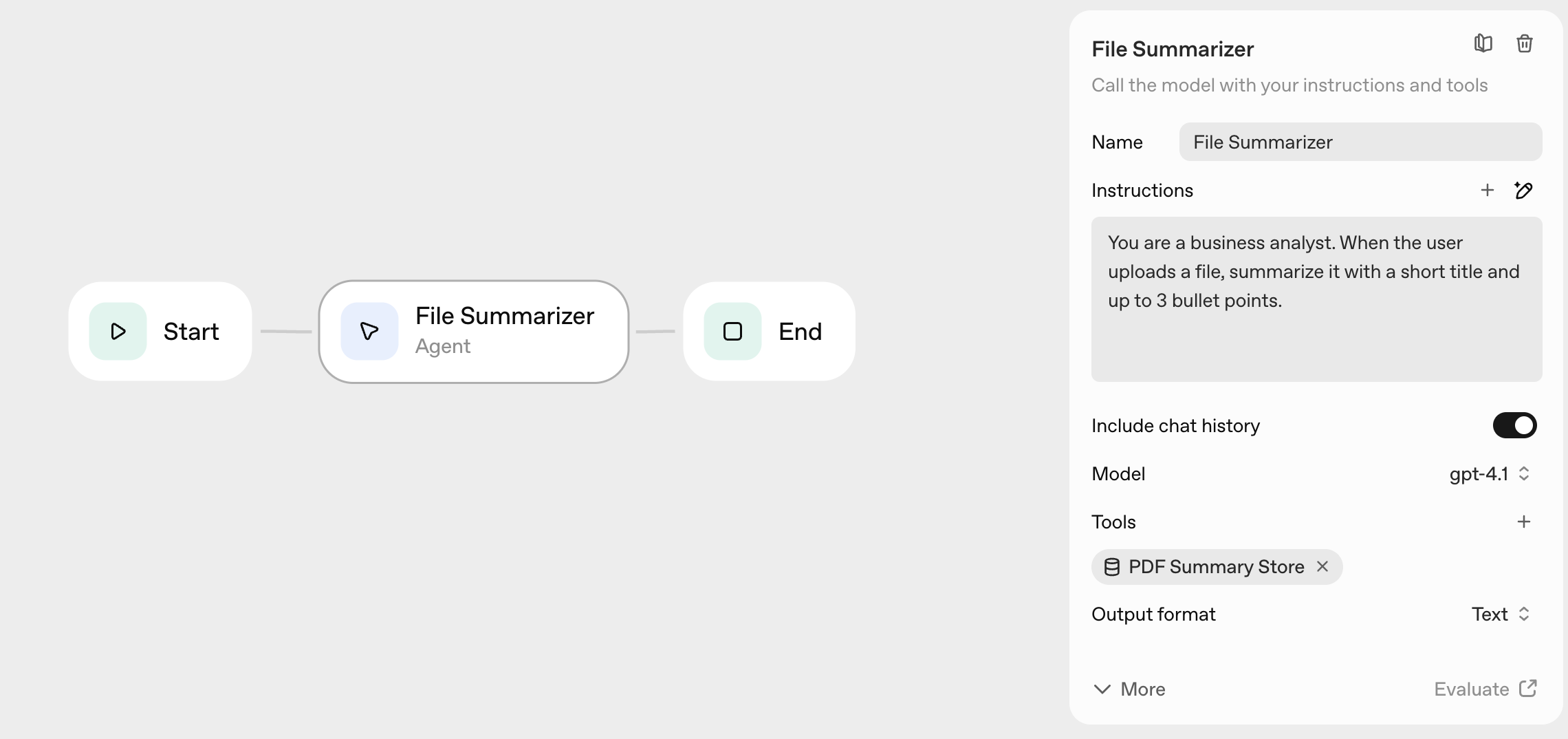
This worked, but felt less polished than web search. File uploads in Preview are smooth, but the code version requires more setup (file upload endpoints, storage, cleanup).
ChatKit: The Missing Piece
Agent Builder gives you the logic. ChatKit gives you the UI.
It’s an embeddable chat interface that handles:
- Message bubbles, typing indicators, layout
- File uploads (PDFs, docs, images)
- Tool call visualization
- Error states
You point it at your Agent Builder workflow. It renders the chat interface.
Why not build your own?
I tried. Building a chat UI that handles file uploads, streaming responses, tool calls, and error states took me two weeks. ChatKit does it in one embed.
The real win: what you see in Agent Builder Preview is what users see in ChatKit. No surprises.
How to Embed It
The flow:
- Build your agent in Agent Builder
- Get the workflow ID
- Create an API endpoint that issues client secrets
- Mount ChatKit in your frontend
Minimal server (Next.js):
// app/api/chat/route.ts
import OpenAI from "openai";
import { NextResponse } from "next/server";

const client = new OpenAI();

export async function POST() {
  // Create a short-lived client secret for ChatKit
  const session = await client.beta.realtime.sessions.create({
    model: "gpt-4o",
    // workflow_id: "your-workflow-id" // bind to Agent Builder workflow
  });

  return NextResponse.json({
    client_secret: session.client_secret
  });
}
Frontend embed:
<script src="https://cdn.openai.com/chatkit/chatkit.js"></script>
<div id="chat-container"></div>
<script>
  ChatKit.mount({
    container: document.getElementById('chat-container'),
    // Configuration from your server
  });
</script>
This worked surprisingly well. The hardest part was understanding the client secret flow (short-lived tokens for security).
When Does This Approach Fail?
Not everything worked smoothly. Here’s where I hit walls:
Complex conditional logic: If/Else nodes work for simple branching, but anything more complex gets messy fast. The visual canvas doesn’t scale well beyond 10-15 nodes.
Custom tool integration: Built-in tools (web search, file search) work great. Custom tools require more setup and the visual builder doesn’t help much there.
Debugging production issues: Traces in Preview are excellent. Traces in production? You’re back to logs and monitoring. The gap between dev and prod experience is real.
Team collaboration: Only one person can edit a workflow at a time. No version control, no diff view, no merge conflicts (because no merging). For solo projects, fine. For teams, limiting.
The Honest Assessment
After building several agents with this stack, here’s what I think:
Agent Builder works best for:
- Prototyping new agent ideas (10x faster than code)
- Simple production agents (3-5 nodes, straightforward logic)
- Solo developers or small teams
- Projects where built-in tools (web search, file search) are enough
It struggles with:
- Complex multi-step workflows (visual canvas gets messy)
- Heavy customization (custom tools, complex logic)
- Team collaboration (no version control, no simultaneous editing)
- Production debugging (traces don’t carry over from Preview)
The real value isn’t replacing code entirely. It’s this:
Prototype visually, debug with traces, export to code when stable.
That workflow actually works. Trying to do everything in the visual builder? That’s where it breaks down.
Where This Might Evolve
I see two paths:
Path 1: Better visual tooling - version control for workflows, collaborative editing, production traces, more node types. Make the visual builder powerful enough for complex production use.
Path 2: Code-first with visual debugging - write agents in code, visualize execution in Agent Builder, use traces for debugging. The visual layer becomes a debugging tool, not a building tool.
My bet? Path 2. Visual programming has always struggled with complexity. But visual debugging? That’s where the real value is.
The trace view in Agent Builder is the killer feature. Everything else is nice-to-have.
Have you tried Agent Builder? Curious what worked (and what didn’t) for others. This space is moving fast, and I suspect better patterns will emerge.
Links:
Find me on X if you want to share your experiments or challenge my assumptions.